
Sitemap index: what it is, its limits and how to read one

A sitemap index is an XML file that lists other sitemaps instead of pages. WordPress, Yoast SEO and Rank Math all publish one, and large sites need one once they pass 50,000 URLs. Here is its format, the limits that Google and the protocol set, the errors that come up most often, and three ways to read every child sitemap it points to.
Sitemap index format and limits
A sitemap index lists sitemaps, not pages. Search engines open it, then each file it names, and only then reach your page URLs. Large sites need one because a single sitemap holds at most 50,000 URLs and 50MB. WordPress, Yoast SEO and Rank Math use one even on small sites, because they split URLs by content type. Our guide shows where WordPress publishes its index.
The root element is sitemapindex, in the same namespace as a normal sitemap. Each listed file gets a sitemap entry with two tags:
loc: the full URL of the child sitemap. It is required.lastmod: when that file was last modified, in W3C Datetime format. It is optional.
<?xml version="1.0" encoding="UTF-8"?>
<sitemapindex xmlns="http://www.sitemaps.org/schemas/sitemap/0.9">
  <sitemap>
    <loc>https://example.com/post-sitemap.xml</loc>
    <lastmod>2026-10-28T09:12:00+00:00</lastmod>
  </sitemap>
  <sitemap>
    <loc>https://example.com/page-sitemap.xml.gz</loc>
    <lastmod>2026-10-02</lastmod>
  </sitemap>
</sitemapindex>
There is no changefreq or priority in an index. Note what lastmod means here: sitemaps.org defines it as the time the sitemap file changed, not the pages inside it. A child can be gzipped, as in the second entry.
The limits come from the sitemaps.org protocol, and Google adds a few:
| Rule | Value | Source |
|---|---|---|
| Sitemaps listed in one index | 50,000 at most | sitemaps.org, Google |
| File size | 50MB (52,428,800 bytes) uncompressed | sitemaps.org, Google |
| Compression | gzip allowed | sitemaps.org |
| Index files per site in Search Console | 500 | |
| Index inside an index | not allowed |
Google says every sitemap requirement also applies to index files, so the 50MB limit is measured after decompression.
Nesting and same-host rules
Google does not accept an index inside an index. Its Sitemaps report help says an index can list only sitemap files, and the report shows a nesting error when it finds one. The protocol says nothing either way, so some generators still nest them. Flatten the tree: point the top file straight at the files that contain URLs. With more than 50,000 sitemaps, split them across several index files and submit each one.
The protocol also says an index can only list sitemaps on the same site. Google adds two details:
- Child sitemaps must be in the same directory as the index, or lower in the site hierarchy.
- The same-site rule is waived if you set up cross-site submission, which means proving that you control each host.
So an index at https://example.com/sitemap.xml should not list https://cdn.example.net/products.xml or http://www.example.com/posts.xml. Both count as other hosts. For a URL at a higher level or on another domain, the report says “URL not allowed”.
Submit it in Search Console and robots.txt
In the Sitemaps report, enter the index URL and click Submit. That one submission covers every child. For an index, the help page says, “Discovered pages” counts all URLs in all child sitemaps. You can also submit a child when you want its own row and status, but you do not have to.
- Redirects are not followed for the URL you submit. Submit the final address that answers with a 200 status.
- The report lists only sitemaps submitted there or through the API, so a file Google found in robots.txt does not appear.
In robots.txt, add one line with the full URL, anywhere in the file:
Sitemap: https://example.com/sitemap_index.xml
The protocol says that with an index, you can give the location of that file only. The line belongs to the sitemaps.org protocol, so it is not specific to Google.
Common errors and their causes
Most problems come from the children, not from the index file.
- Child on another host. A move from
httptohttps, or fromwwwto nowww, leaves old URLs in the index. Everylocmust use the scheme and host of the index. - Relative URL.
<loc>/post-sitemap.xml</loc>is not valid. Google reports an incomplete URL. - Child returns 404. A plugin was turned off, a content type was removed, or a cache serves an old index.
- Child returns HTML. A login page, a security challenge or the theme’s 404 page sent with a 200 status. Our article on the Couldn’t fetch status shows how to spot this with a live test.
- Wrong lastmod format.
15/10/2026is not W3C Datetime. Write2026-10-15, or2026-10-15T14:30:00+00:00with a time and a time zone. Google reports “Invalid date”. - Nested index. List the files it contains instead.
How to read every child sitemap
Opening fifty files one by one is slow. Here are three ways to see them all.
Check the index file with the Sitemap Checker
Paste the index into the free Sitemap Checker, or open the .xml or .xml.gz file. It recognizes an index and lists each child with its lastmod in a Sitemaps table. It flags relative or non-http URLs, invalid dates, duplicates, children on several hosts, url entries or changefreq and priority placed in an index, and files over 50,000 entries or 50MB.
It checks that one file only. The page never connects to other websites, so it does not open the children and cannot tell whether one returns a 404 or HTML. Its verdict reminds you to check each listed sitemap too.
Load all child sitemaps with XMLNest
The XMLNest extension for Chrome opens a live index in its Reader view. Click “Load all child sitemaps” and it requests the children one at a time, with a progress line and a Cancel button:
- Only children on the same site as the index (same scheme, host and port) are requested. The others show “Skipped: on another site, never requested”.
- Up to 50 children, 50MB each;
.gzfiles are decompressed. - Redirects are not followed, and a nested index is skipped.
- Each failure says why: the HTTP status, “not well-formed”, or “not a sitemap” with the root tag it found, which is how an HTML page shows up.
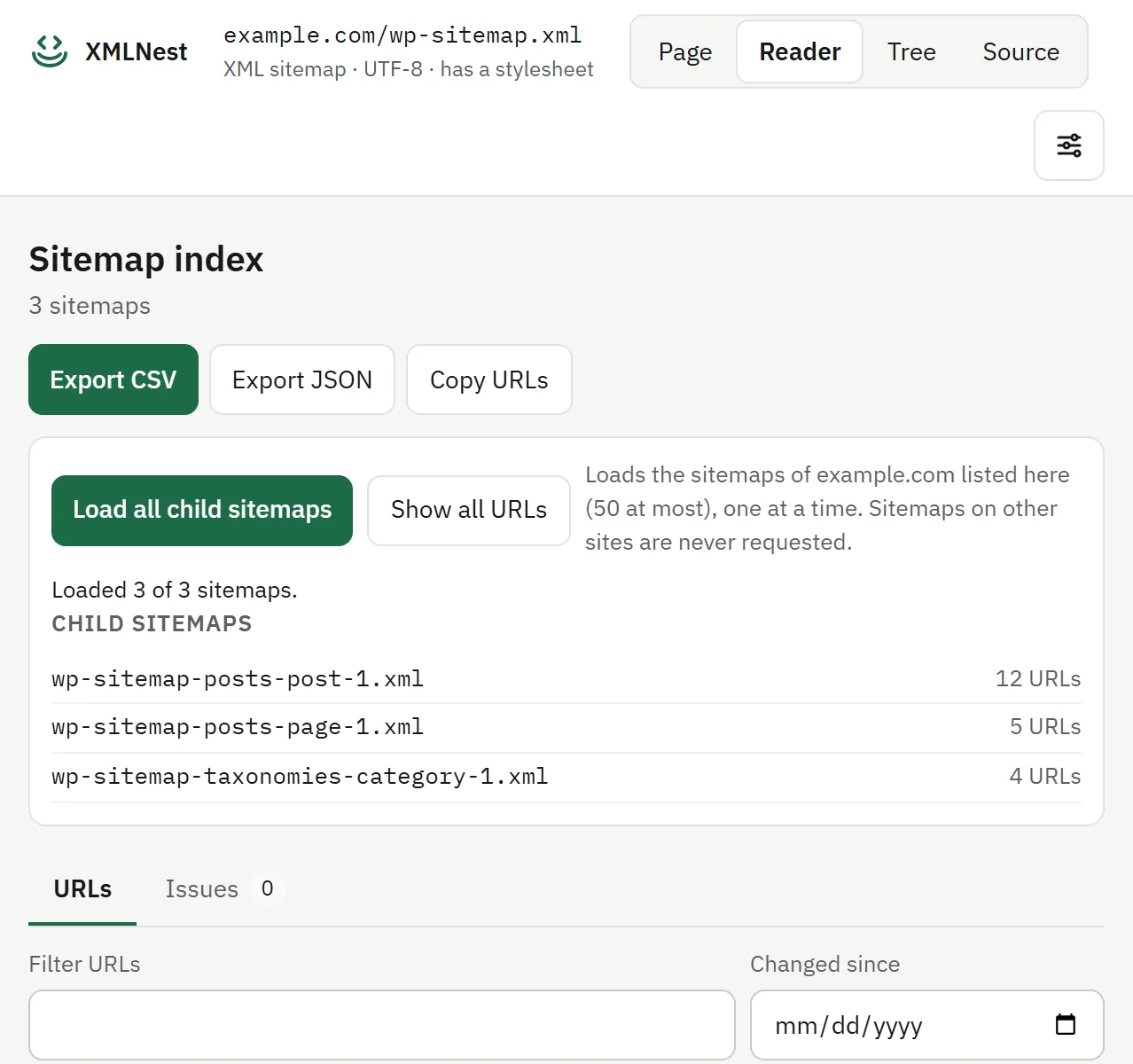
The URLs of all loaded children go into one table with a column for their source file. The Issues tab runs the Sitemap Checker rules on each file and lists URLs found in two child sitemaps. Our article on extracting URLs from a sitemap covers the CSV and JSON export.
Expand the index with Python
This function reads an index, follows each child on the same host, decompresses gzip and prints every page URL once. It uses only the standard library.
import gzip
import sys
import urllib.request
import xml.etree.ElementTree as ET
from urllib.parse import urlsplit

NS = "{http://www.sitemaps.org/schemas/sitemap/0.9}"

def fetch(url):
    req = urllib.request.Request(url, headers={"User-Agent": "expand-index/1.0"})
    with urllib.request.urlopen(req, timeout=30) as resp:
        data = resp.read()
    if data[:2] == b"\x1f\x8b":  # gzip, whatever the file name says
        data = gzip.decompress(data)
    return ET.fromstring(data)

def locs(root, entry):
    return [el.text.strip() for el in root.findall(f"{NS}{entry}/{NS}loc") if el.text]

def page_urls(index_url):
    root = fetch(index_url)
    if root.tag == NS + "urlset":
        return locs(root, "url")
    host = urlsplit(index_url).netloc
    pages = []
    for child in locs(root, "sitemap"):
        if urlsplit(child).netloc != host:
            print("skipped, other host:", child, file=sys.stderr)
            continue
        try:
            sub = fetch(child)
        except Exception as err:
            print("failed:", child, err, file=sys.stderr)
            continue
        if sub.tag != NS + "urlset":
            print("skipped, not a urlset:", child, file=sys.stderr)
            continue
        found = locs(sub, "url")
        print(f"{child}: {len(found)} URLs", file=sys.stderr)
        pages.extend(found)
    return pages

if __name__ == "__main__":
    for url in dict.fromkeys(page_urls(sys.argv[1])):
        print(url)
Run python expand_index.py https://example.com/sitemap.xml > urls.txt. The report goes to the screen and the URLs to the file. We ran it on a local test index with five entries. It read two children, one of them gzipped, and returned their five page URLs. It skipped a nested index and a child on another host, and reported “HTTP Error 404” for a missing file.
Checklist before you submit
- The root is
sitemapindexwith the sitemaps.org namespace, and each entry has a fullloc. - At most 50,000 entries and 50MB uncompressed; no index inside an index.
- Every child is on the same host and scheme as the index, in the same directory or lower.
- Every child answers 200 with XML, not a redirect, a 404 or HTML.
lastmoduses W3C Datetime and changes when the file changes.- Submit the index once in Search Console, and add a
Sitemap:line to robots.txt.
Questions
Should I submit the sitemap index or each child sitemap?
Submitting the index is enough: Google reads the sitemaps it lists, and the Discovered pages count of the index adds up the URLs of all its child sitemaps. You can also submit a child on its own if you want its status in a separate row.
Can a sitemap index list another sitemap index?
No. Google's help says that a sitemap index can list only sitemap files, and it reports the error Nested sitemap indexes when it finds one. If you have more than 50,000 sitemaps, split them across several index files and submit each one.
Does the lastmod of a sitemap entry describe the pages?
No. In a sitemap index, lastmod is the time the sitemap file itself was modified. The dates of the pages go in the lastmod tags of the child sitemaps.
Sources
- sitemaps.org: Protocol (checked on 29 October 2026)
- Google Search Central: Manage your sitemaps with sitemap index files (checked on 29 October 2026)
- Google Search Central: Build and submit a sitemap (checked on 29 October 2026)
- Manage your sitemaps using the Sitemaps report - Search Console Help (checked on 29 October 2026)
- XMLNest test: the Python script below, run with Python 3.14.3 on a local sample index : Index with 5 entries: 2 child sitemaps read (one gzipped, 5 page URLs in all), 1 nested index skipped, 1 child answering 404, 1 child on another host skipped. (checked on 29 October 2026)