View a WordPress sitemap: core, Yoast and Rank Math
Every WordPress site can publish an XML sitemap, and SEO plugins such as Yoast SEO and Rank Math publish their own. Here is how to view a WordPress sitemap: where to find it, how to read it, and what changes in Chrome once XSL stylesheets stop working there.
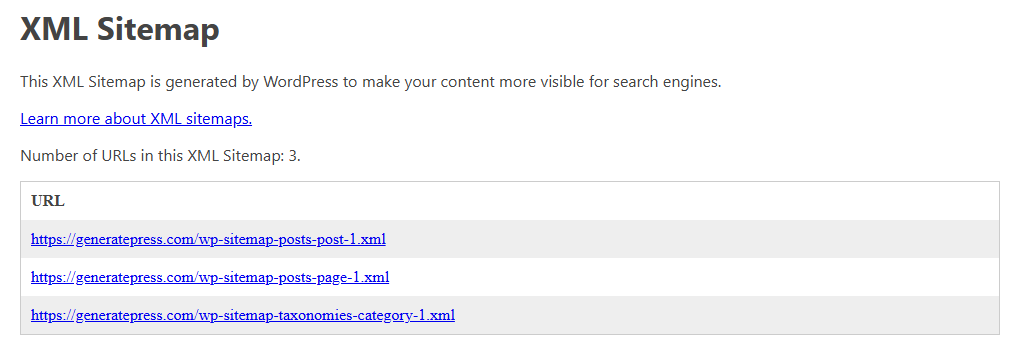
Find the sitemap address
A WordPress site has one main sitemap file, the sitemap index. Its address depends on what creates it:
| Setup | Sitemap index address |
|---|---|
| WordPress core, since version 5.5 | /wp-sitemap.xml |
| Yoast SEO | /sitemap_index.xml |
| Rank Math | /sitemap_index.xml |
Add the address to the domain name, for example https://example.com/wp-sitemap.xml, and open it in Chrome.
- WordPress core. The WordPress announcement for version 5.5 says that WordPress exposes a sitemap index at
/wp-sitemap.xml, and that the site’s robots.txt file references it so that search engines can find it. - Yoast SEO. Yoast’s developer specification says that the index is available at
/sitemap_index.xml. In the plugin, Yoast’s help describes the path “Yoast SEO”, “Settings”, “Site features”, then the “XML sitemaps” switch under “Technical SEO” and its link “View the XML sitemap”. - Rank Math. Rank Math’s knowledge base says that the plugin creates a sitemap index at
/sitemap_index.xml, and that each tab of its sitemap settings shows the address of the matching sitemap at the top of the page.
Not sure which one a site uses? Open /robots.txt on the same domain and look for a line that starts with Sitemap:. sitemaps.org defines this line to point search engines to a sitemap, and says that when a site has an index, the line only needs to give the index.
Read a sitemap index
A sitemap index does not list your pages. It lists other sitemaps. The sitemaps.org protocol defines it as a sitemapindex element that contains one sitemap entry per file, each with its address in loc and, optionally, the date of its last change in lastmod. An index may list up to 50,000 sitemaps, according to the protocol.
Each listed sitemap is a urlset element with one url entry per page: the page address in loc, and optionally lastmod, changefreq and priority. sitemaps.org limits each file to 50,000 URLs and 50MB.
WordPress and the plugins split the content in their own way:
- WordPress core creates sitemaps for all public post types and taxonomies, such as posts, pages and categories, and for author archives. Its announcement says that a single sitemap holds at most 2,000 entries, a limit that developers can change.
- Yoast SEO links from its index to sub-sitemaps for posts, pages, authors, categories, tags and other taxonomies. Its specification gives a default limit of 1,000 items per sitemap.
If you check dates, note what Google’s sitemap guide says: Google ignores priority and changefreq, and uses lastmod only when it is consistently and verifiably accurate.
Why it looks like a web page today
Open a WordPress core sitemap in Chrome today and you see a page with a title, a short explanation and a table of links, not raw XML. The file asks for this itself. Near the top, a processing instruction, <?xml-stylesheet ... ?>, points to an XSL stylesheet, and the browser uses it to turn the XML into a page.
The stylesheet comes with the sitemap. The WordPress announcement says that WordPress core provides XSL stylesheets to style all its sitemaps. Yoast’s specification says that its sitemap index and its sitemaps reference an XSL file that provides their layout and styling.
The stylesheet only changes what you see. The addresses and dates in the file stay the same.
What changes after 17 November 2026
Chrome’s announcement says that XSLT stops working in Chrome 158, on 17 November 2026, for all users except sites in its origin trial and browsers managed with an enterprise policy. From then on, Chrome no longer applies the stylesheet of a sitemap, so the table it built disappears, and Chrome shows a warning banner that links to an extension search page. Learn more about what breaks when XSLT leaves Chrome.
This change happens in the browser. Nothing changes in the sitemap file on the site: it keeps the loc and lastmod entries that Google’s sitemap guide describes.
Keep reading it in Chrome
You have three simple ways to keep an eye on a sitemap.
- XMLNest. XML pages that use an XSL stylesheet (version 1.0) look the way Chrome used to show them, so a WordPress sitemap keeps its table. XMLNest also has a reader view for XML sitemaps: a table you can filter by text or date, sort, and export to CSV or JSON. Sitemap index files list their parts as links.
- The official XSLT Polyfill extension. Chrome’s announcement links to XSLT Polyfill, whose Store page says it applies an XSLT polyfill to all XML documents. If you only want styled sitemaps back, with the extension Chrome links to, it is a good choice.
- Search Console. Site owners can submit the sitemap index in the Sitemaps report: paste its address in the “Add a new sitemap” box, then click “Submit”. The report shows the status of each sitemap, the number of page addresses Google found in it, and when Google last read it.
To read any other XML file, see how to open an XML file in Chrome.
Questions
Is my sitemap broken for Google after Chrome removes XSLT?
No. Chrome's change only affects how Chrome displays the file. The XML file on your site stays the same, with the same addresses and dates that Google's sitemap guide describes. The Sitemaps report of Search Console shows whether Google could read it.
Which sitemap address should I submit to Google Search Console?
Submit the sitemap index: /wp-sitemap.xml for WordPress core sitemaps, or /sitemap_index.xml for Yoast SEO and Rank Math. Google accepts a single index file, and the Sitemaps report lists it as a sitemap index.
Sources
- Make WordPress Core: New XML Sitemaps Functionality in WordPress 5.5 (checked on 14 October 2026)
- Yoast: XML sitemaps in the Yoast SEO plugin (checked on 14 October 2026)
- Yoast developer portal: Yoast SEO XML Sitemaps, Functional specification (checked on 14 October 2026)
- Rank Math: How to Configure Sitemaps in Rank Math - Best Settings and Tips (checked on 14 October 2026)
- sitemaps.org - Protocol (checked on 14 October 2026)
- Google Search Central: Build and Submit a Sitemap (checked on 14 October 2026)
- Sitemaps report - Search Console Help (checked on 14 October 2026)
- Chrome for Developers: Removing XSLT for a more secure browser (checked on 14 October 2026)
- XSLT Polyfill - Chrome Web Store (checked on 14 October 2026)